

English
SSO/SAML Configuration – WatchGuard AuthPoint
Configuration SSO/SAML – WatchGuard AuthPoint
For detailed steps and configuration within the WatchGuard interface, please refer to the official documentation: https://www.watchguard.com/help/docs/help-center/en-US/Content/Integration-Guides/AuthPoint/Amazon-Cognito-user-pool-saml_authpoint.html?cshid=17318#ConfigureAuthPoint.
This document outlines the information required to configure SSO/SAML authentication using WatchGuard AuthPoint. It provides an overview of the parameters to be prepared and the data to be supplied in order to complete the integration.
Required Information for Configuration
When configuring SAML in WatchGuard AuthPoint, the following information will be required.
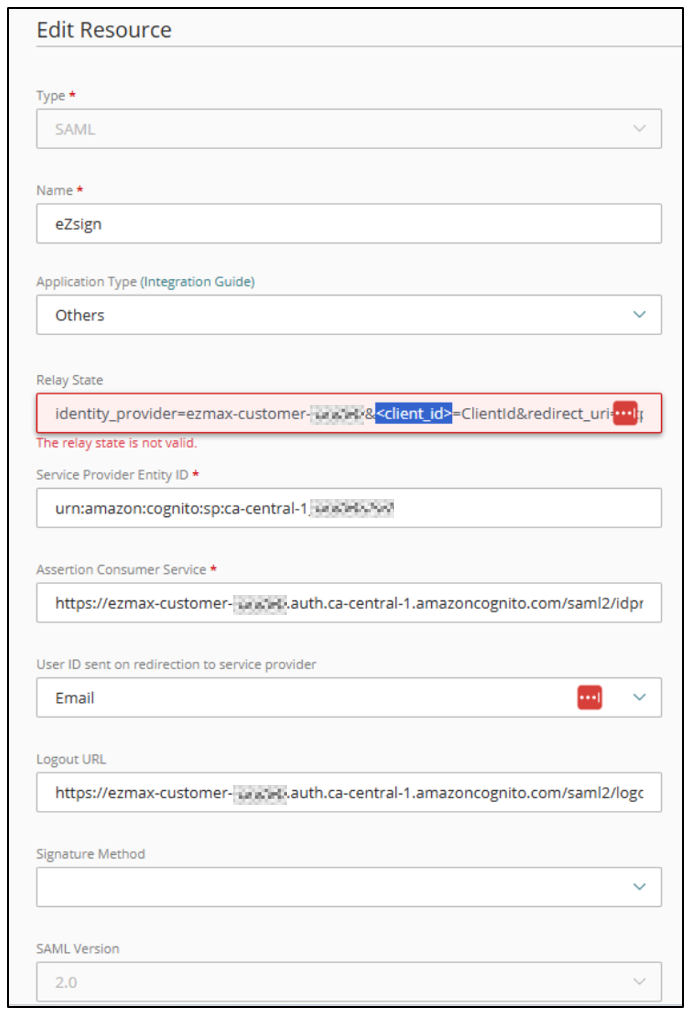
Relay State
The Relay State value must be configured using the following format:
identity_provider=ezmax-customer-<client_code>&<Client_ID>=ClientId&redirect_uri=https://prod.ezsignlogin.global.ezmax.com/auth-sso?pksEzmaxcustomerCode=<client_code>&response_type=code&scope=email+openid+phone
NOTE: The <client_code> and <Client_ID> values will be provided during the configuration process.
Client ID
The Client ID is required to complete the Relay State configuration.
NOTE: This value will be provided once the metadata URL (Metadata URL) from your environment has been received.
Service Provider Entity ID
The following value must be configured:
urn:amazon:cognito:sp: <unique_value_to_be_provided>
Assertion Consumer Service (ACS)
The SAML assertion consumer URL must be configured as follows:
https://ezmax-customer-<client_code>.auth.<region>.amazoncognito.com/saml2/idpresponse
NOTE: The region used is typically: ca-central-1.
Logout URL (optional)
If a logout URL is required by the interface, the following value may be used:
https://ezmax-customer-<client_code>.auth.<region>.amazoncognito.com/saml2/logout
NOTE: This information is optional and is not used within the context of the application.
Attributes to Configure
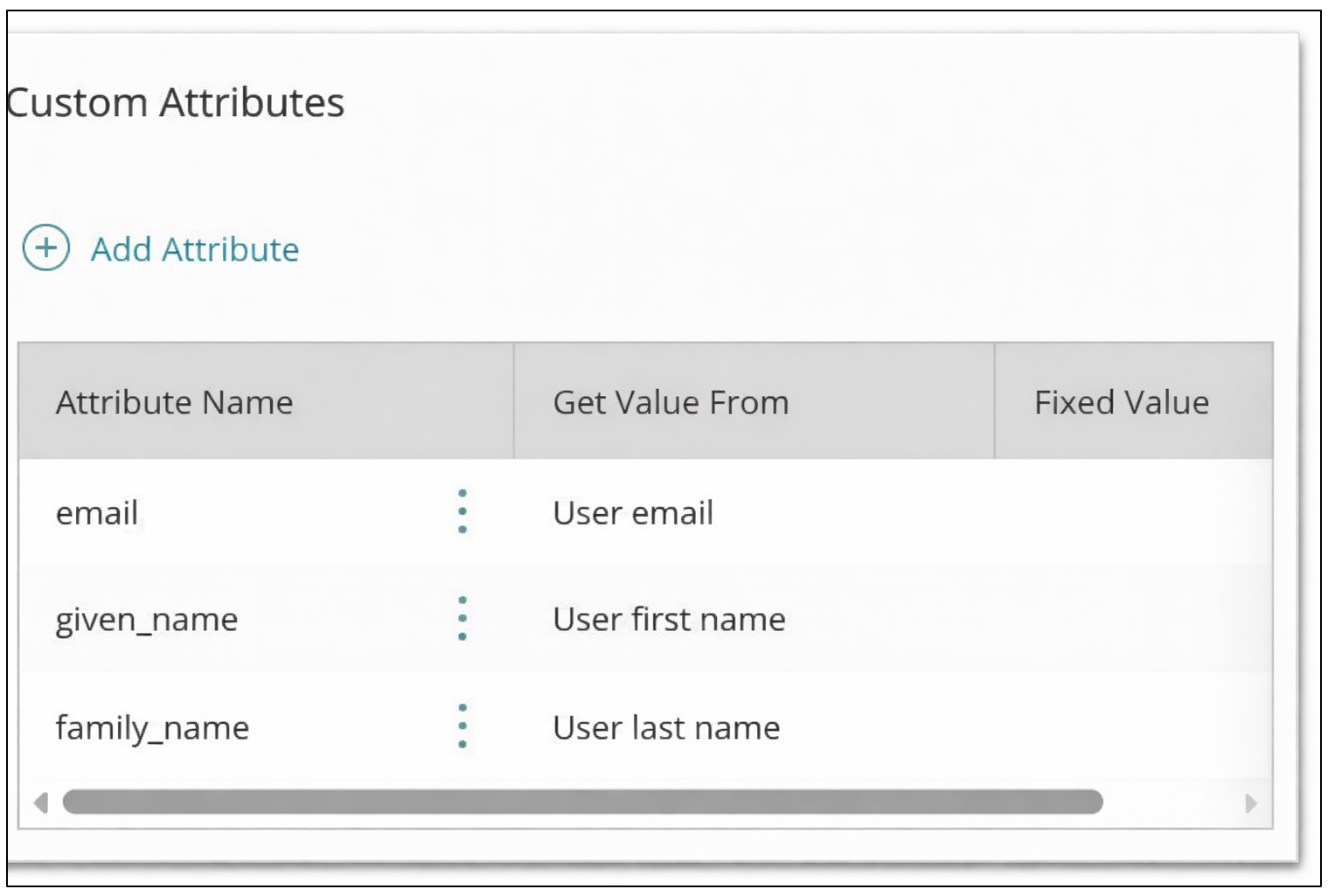
The following attributes must be sent during SAML authentication:
email : user email address
given_name : user first name
family_name : user last name
An additional attribute may be configured if required:
- Groups (optional): useful if group management is required.
Login URL
The following URL can be used to add a login link in the Applications section of the IdP portal:
https://prod.ezsignlogin.global.ezmax.com/fr/login/<client_code>
SAML Metadata
To complete the configuration, the metadata URL (Metadata URL) from your identity provider must be provided.
This information is required to finalize the integration and to supply the required Client ID.
Validation
Once the configuration is complete, a login test can be performed.
If all information has been correctly configured, the SSO authentication should function as expected.