

English
List and History of Sessions
It is possible to view the list of sessions that are currently active and sessions that took place previously, for all users.
Active Sessions
- From Main menu >> Admin >> List of Active Sessions.

You will be able to see, among other things, which users are currently logged in.
You can view the user’s information by clicking on his User Code. For more information, please see the article Adding/Editing a User.
You can view the computer’s information by clicking on its Computer Code. For more information, please see the article List of Computers (444) (Upcoming article).
If you want to get the list in Excel format, click on Actions >> Excel Icon. Click on Open or Save.
Previous Sessions
- From Main menu >> Admin >> Session History.
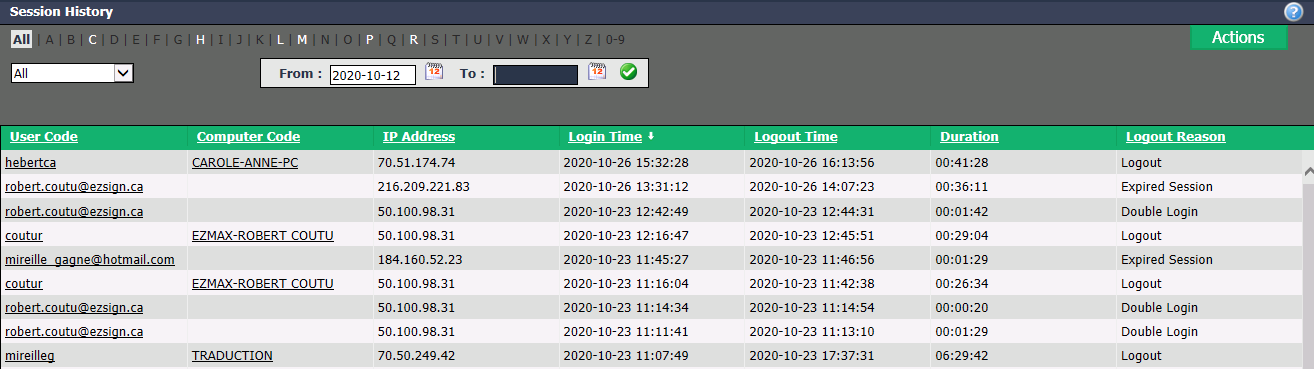
You will be able to see, among others, the Login Time , the Logout Time as well as the Logout Reason of the users.
You can filter the sessions by the following types:
- "All": All types of sessions.
- "Attack": There was an attempted breach of data security.
- "Expired Session": For security reasons, after 3 hours of inactivity, a user’s session has expired.
- "Double Login": The user has more than one session open at the same time.
- "Normal Logout": The user used the X at the top right of the page to log out.
- "Blocked Account": The user tried to log in three times with an incorrect password.
- "Inactive Account": In the user’s profile, the Active box has been unchecked.
- "Invalid User": The user tried to log in once or twice with an incorrect password.
You can also filter the sessions by date by entering the desired dates in the From and To fields.
You can view the user’s information by clicking on his User Code. For more information, please see the article Adding/Editing a User.
You can view the computer’s information by clicking on its Computer Code. For more information, please see the article List of Computers (444) (Upcoming article).
If you want to get the list in Excel format, click on Actions >> Excel Icon. Click on Open or Save.