

English
Adding a Referral after a Commission Calculation and Payment
If you made a commission calculation and payment (the money is cashed, so you cannot reverse the calculation) but you forgot to include a referred agent in the transaction, he can be added to pay him his commission due and recover the overpayment to the agent who had to share his commission.
- From the closed deal, click on Actions >> Edit Transaction.
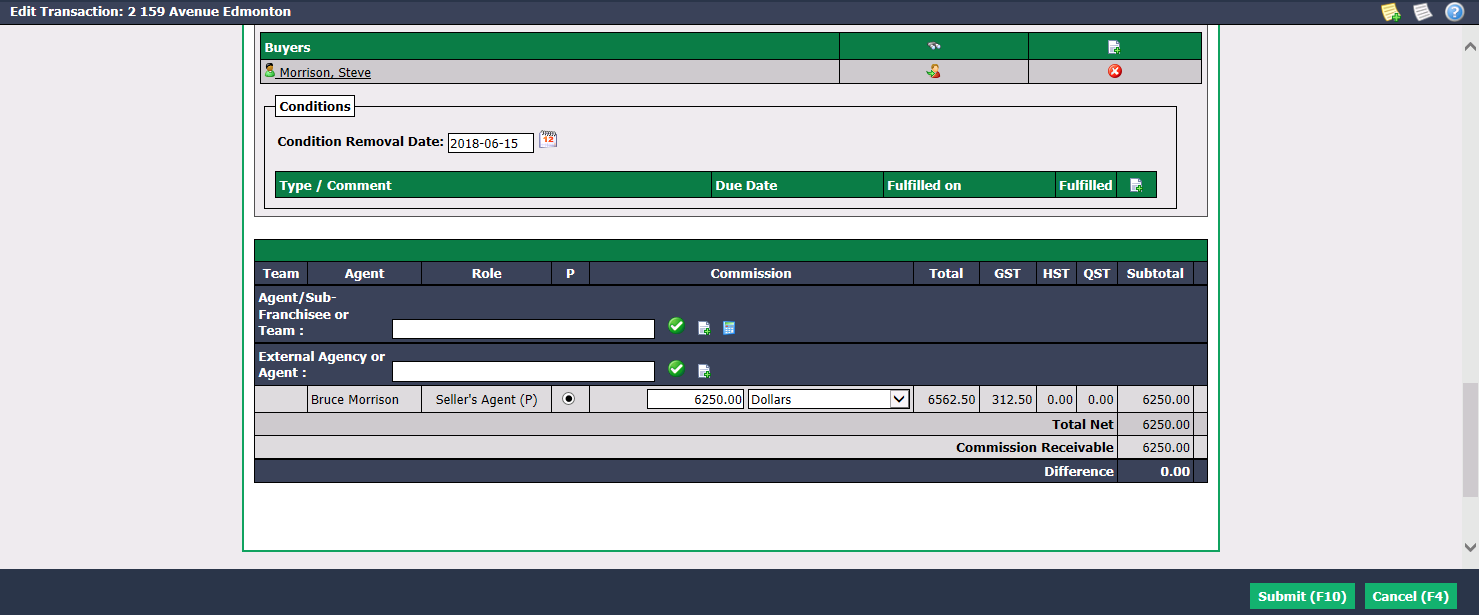
- In the "Deal Information" section, start typing the name of the referral to add in the Agent/Sub-Franchisee or Team field or in the External Agency or Agent field, select it from the list, press TAB key on your keyboard or click on the Check Mark button.
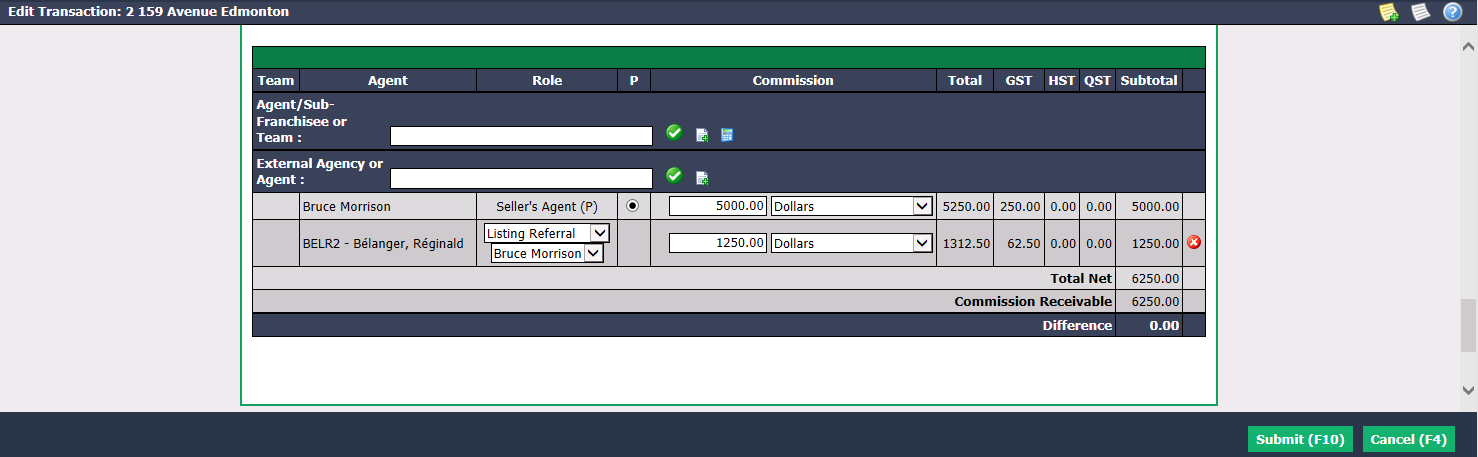
Select the Role of the referral in this transaction : Listing Referral or Deal Referral, and which agent gives him part of his commission.
Indicate the percentage or amount of Commission he will receive. In this example, Bruce Morrison is the Seller’s Agent (P) and initially had $6,500.00 in commission. You added Réginald Bélanger as the listing referral referral in the transaction and it is Bruce Morrison who gives him $1,250.00 of his commission. In Commission , you have to enter $5,000.00 for Bruce Morrison and $1,250.00 for Réginald Bélanger.
Warning
The Difference must always be $0.00 before clicking on Submit.
Click on Submit and the page of the transaction will appear.
Click on Actions >> Commission Calculation.
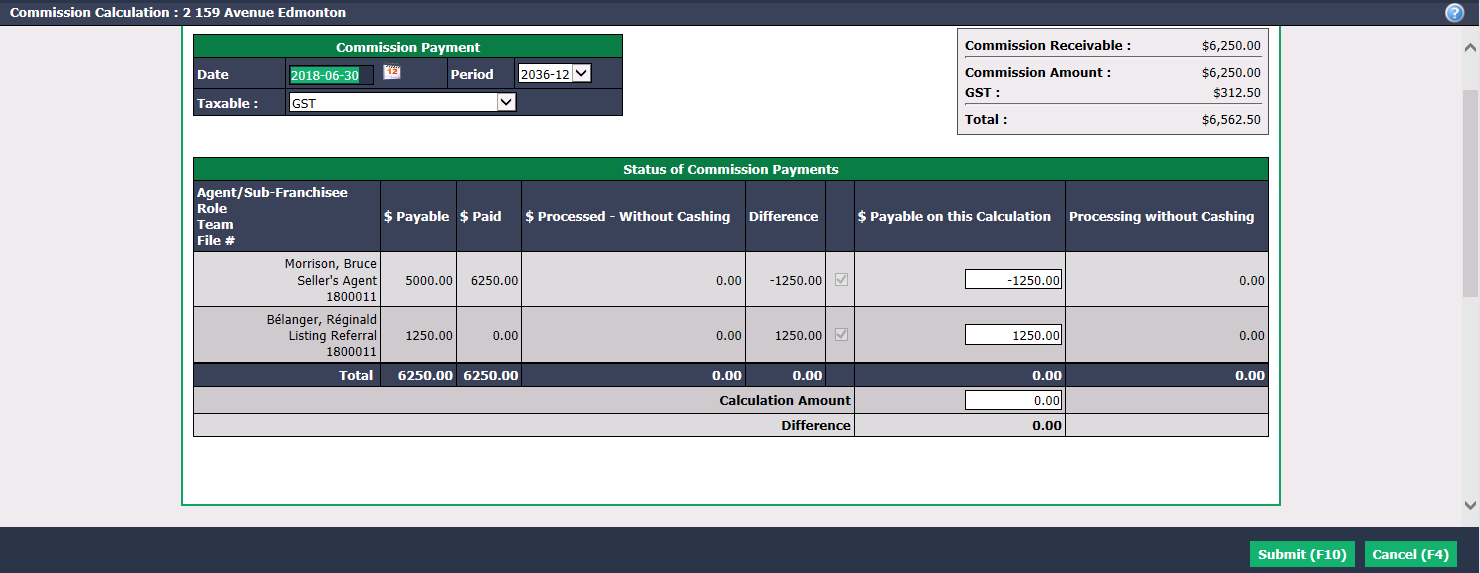
- The system will have automatically filled the $ Payable on this Calculation field and the Calculation Amount as well as the Difference will be $0.00. In this example, Bruce Morrison received an amount of $6,500.00 ($ Paid) but he should have received $5,000.00 ($ Payable). He must therefore reimburse the agency an amount of $1,250.00 ($ Payable on this Calculation). Réginald Bélanger will receive an amount of $1,200.00 ($ Payable on this Calculation).
NOTE: The deposits section will not be affected.
- Click on Submit.
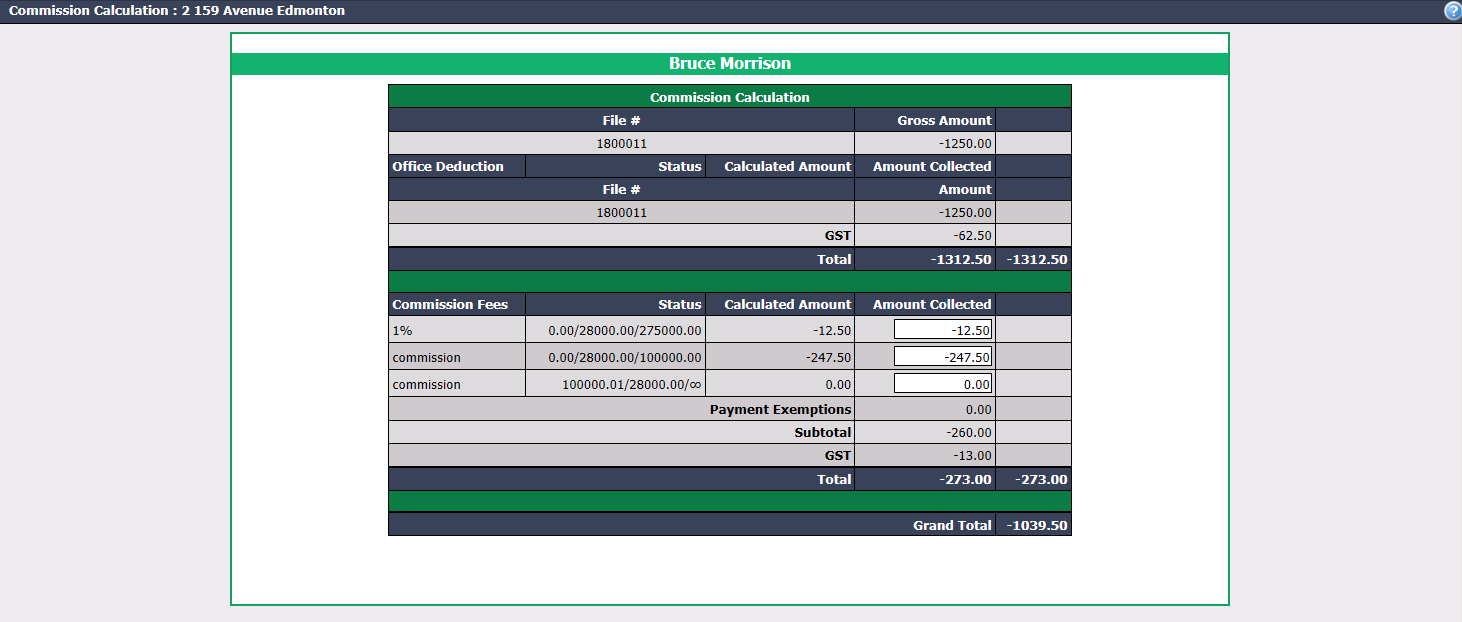
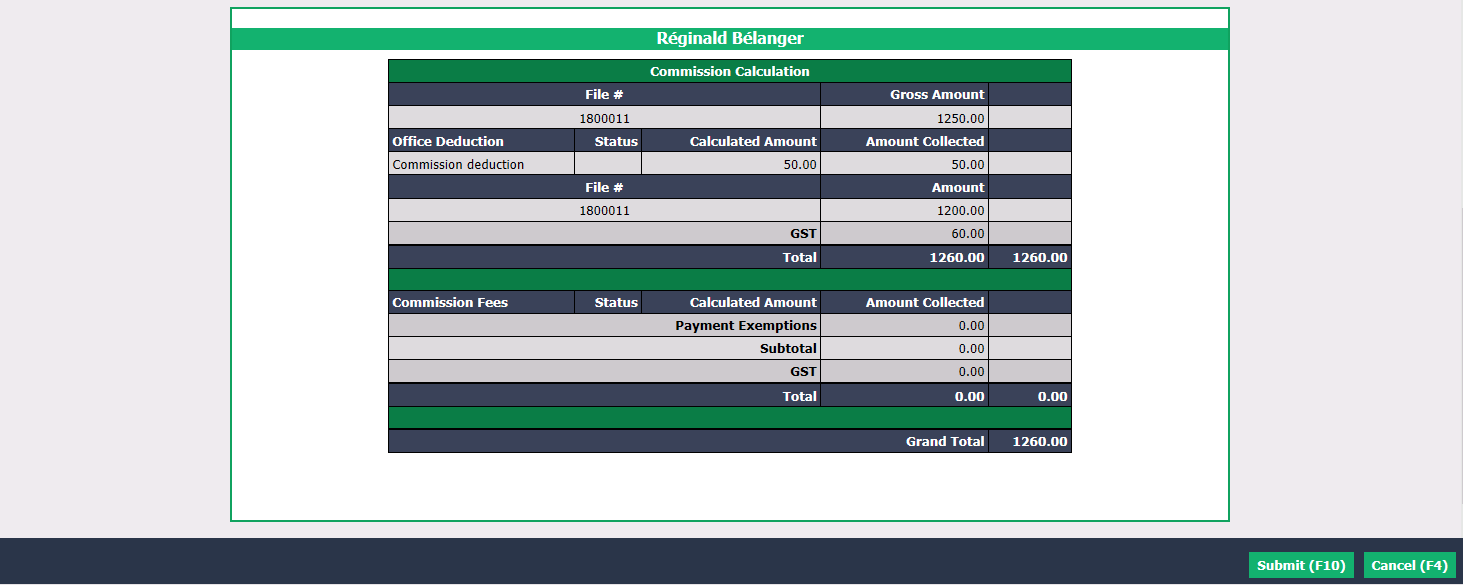
For each agent, verify the Amounts Collected automatically entered by the system and change them if necessary. In this example, Bruce Morrison must reimburse $1,250.00 of his received commission and since he paid commission fees on $6,500.00 instead of $5,000.00, the agency must reimburse him $273.00. By adding taxes payable of $62.50 and $13.00, Bruce Morrison has a Grand Total of - $1039.50 which he must reimburse to the agency. For Réginald Bélanger, he will receive $1,250.00 in commission - $50.00 in commission deductions - $60.00 in taxes and he has no commission fees, thus a Grand Total of $1260.00 that he will receive from the agency.
Click on Submit and the "Payment Deductions" table page for each agent will appear. (In this example, the table for a single agent is shown.)
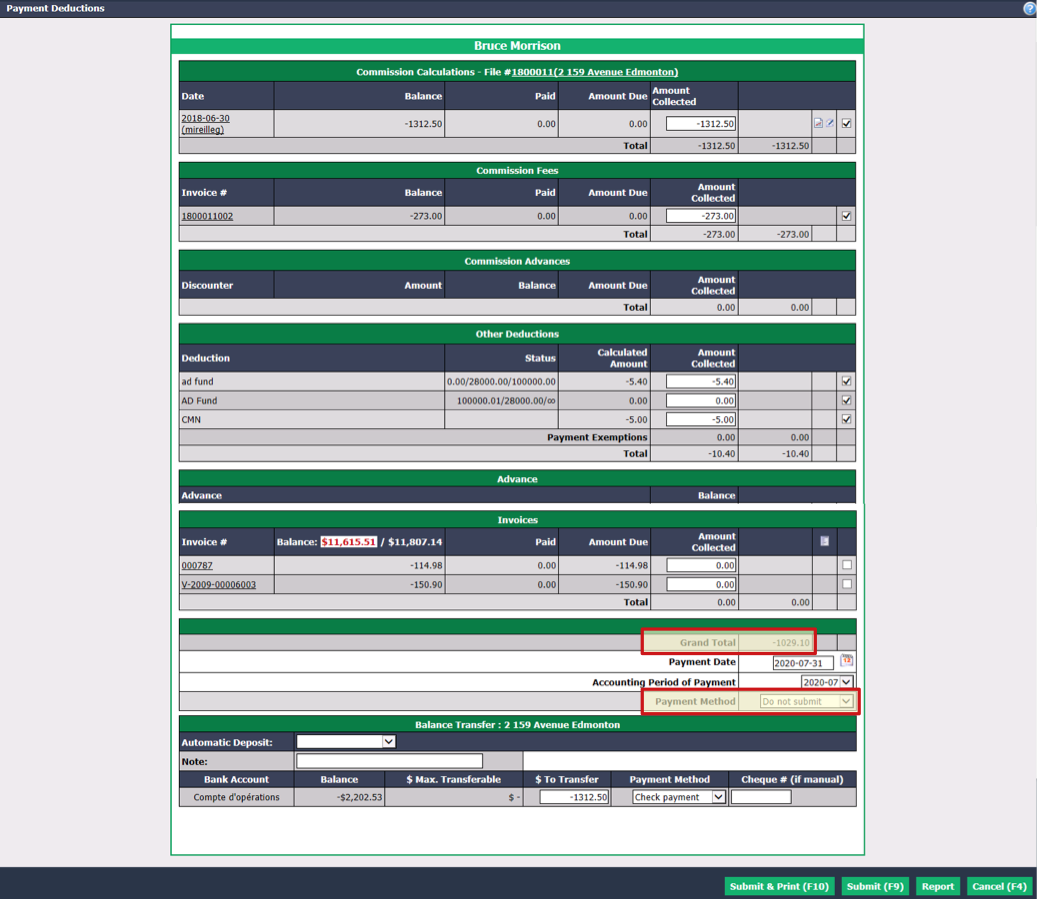
For each of the sections (Other Deductions, Advance, etc.) and for each of the agents, verify the Amounts Collected automatically entered by the system and uncheck them if necessary.
The default Payment Method will be "Do not submit" if the Grand Total is negative (amount to be reimbursed by the agent). In this example, Bruce Morrison must reimburse $1,029.10 to the agency (negative amount).
The default Payment Method will be "Payment by check" if the Grand Total is positive (amount to be paid to the referral). In this example, Réginald Bélanger will receive a cheque of $1,110.00 from the agency (positive amount).
If you click on Submit & Print, a new page will open where you can enter the starting number of the cheque and print the cheque immediately to pay the referral. As for the amount to be reimbursed by the agent, it will appear on the home page under "Commissions Payable". For the reimbursement, there are two options: the amount will be collected when paying another commission to this agent or this agent will issue a cheque to the agency. For more information, please see the article Receiving a Commission Amount.
If you click on Submit , the preparation of payment by cheque to pay the referral will be displayed on the home page under "Cheques in Preparation" and the cheque may be printed later. For more information on payments, please see the article Preparation of Payment by Cheque - Real Estate. As for the amount to be reimbursed by the agent, it will appear on the home page under "Commissions Payable". For the reimbursement, there are two options: the amount will be collected when paying another commission to this agent or this agent will issue a cheque to the agency. For more information, please see the article Receiving a Commission Amount.