

English
Authorizations of an Admin User - Real Estate Transactions
From an Admin user’s profile, it is possible to manage his authorizations. There are 11 tabs that group together the different types of authorizations. In this article, you will see what each of the authorizations of the "Real Estate Transactions" tab allows you to do when "All" is selected.
Real Estate Transactions
From Main menu >> Admin. >> List of Users, click on "Admin" and select the desired user.
Click on Actions >> Manage Authorizations.
Click on the "Real Estate Transactions" tab.
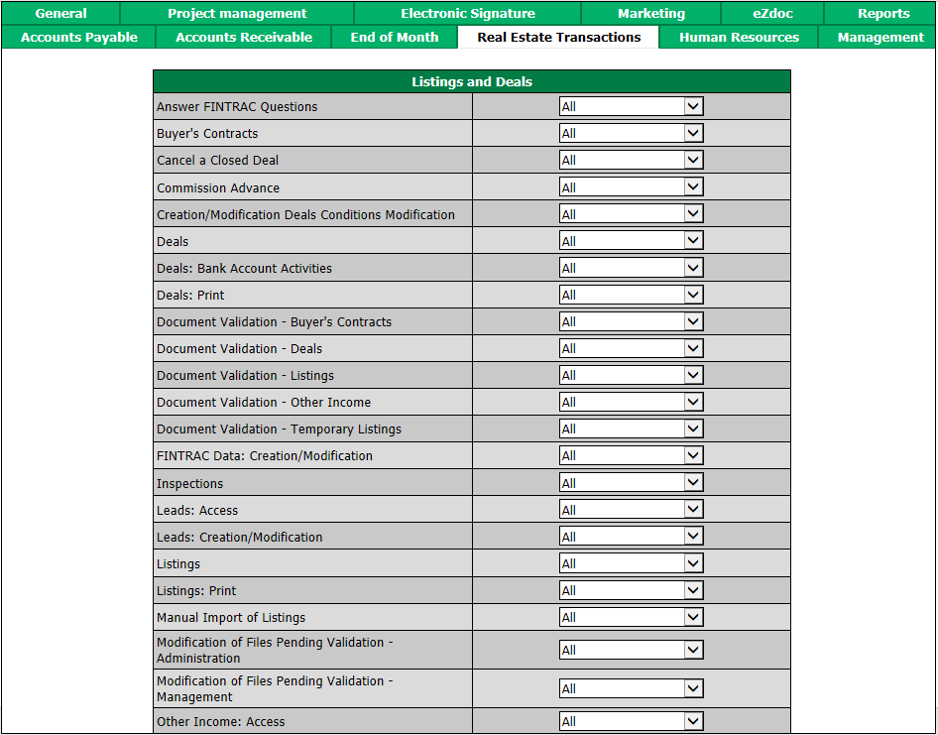
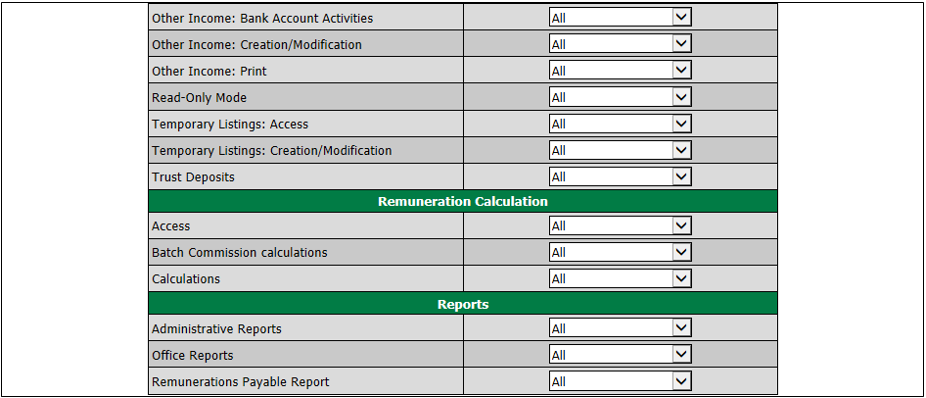
"Listings and Deals" section
Answer to FINTRAC Questions : The user will be able to answer FINTRAC questions in a transaction.
Buyer’s Contract: The user will be able to view, add and edit buyer’s contracts.
Cancel a Closed Deal: The user will be able to cancel a closed deal from the Actions menu in the transaction.
Commission Advance: The user will be able to view the "Commission Advances" section in the transaction page and will be able to add/edit commission advances.
Creation/Modification Deals: Conditions Modification: The user will be able to view, add and edit deal conditions.
Deals : The user will be able to view, add, edit, close and cancel deals.
Deals: Bank Account Activities: The user will be able to view the "Summary of Banking Transactions" in a deal.
Deals: Print : The user will be able to view the icons in the Sending field and Printing , Printing - Row and Printing - Total fields in the "Deal/Files" section of a transaction.
Document Validation -: The user will be able to validate the documents, from the message on the home page "Documents requiring validation - (Files)", as long as he has all the authorizations for these types of folders:
- Buyer’s Contracts
- Listings
- Other Income
- Deals
- Temporary Listings
**FINTRAC Data 😗*Creation /Modification: The user will have access to all Real Estate menu >> FINTRAC and will therefore be able to produce reports, verify identities, search for business relationships and view/add/edit questions.
Inspecti ons: The user will be able to view the list of transactions to be inspected and will be able to view the commission calculations from the "Calculation History" section of a transaction.
Lead s: Access: The user will be able to view the list of leads.
Lead s: Creation/Modification: The user will be able to view, add and edit leads.
Listing s: Print: The user will be able to view the Printing and Labels fields in the "Listing Information/Files" section of a transaction.
Listings : The user will be able to view, add and duplicate transactions (listings and deals) and will be able to edit listings only.
Manual Import of Listings: The user will be able to manually import listings.
Modification of Files Pending Validation - Administration: The user will be able to view the message on the home page "(Files) Pending Validation by the Administration" and will be able to validate the file or remove validation request.
Modification o f Files Pending Validation - Management: The user will be able to view the message on the home page "(Files) Pending Validation by the Management" and will be able to validate the file or remove validation request.
Other Income : Access: The user will be able to view the list of other income.
Other Income: Creation /Modification: The user will be able to view, add and edit other income.
Other Income : Bank Account Activities: The user will be able to view the "Summary of Banking Transactions" in an other income.
Other Income : Print: The user will be able to view the Printing and Printing - Row and Printing - Total fields in the "Files" section of an other income.
Read-Only Mode : The user will be able to view all transactions but there will be no Actions menu.
Temporary Listings: Access: The user will be able to view the list of temporary listings.
Temporary Listings: Creation/Modification**😗* The user will be able to view, add and edit temporary listings.
Trust Deposits : The user will be able to add/edit trust deposits and print their receipts.
"Remuneration Calculation" section
Access : The user will be able to view the "Calculation History" section in a transaction ("Deal" section), as long as he has the authorizations for Read Only Mode and Deals in the "Listings and Deals" section.
Batch Commission calculations****: The user will be able to make commission calculations in batch.
Calculations : The user will be able to view, add, edit and reverse commission calculations.
"Reports" section
Administrative Reports : The user will be able to produce all reports in the Main menu >> Real Estate >> Administrative Reports.
Office Reports : The user will be able to produce all reports in the Main menu >> Real Estate >> Office Reports.
Remunerations Payable Report :