

English
Authorizations of an Admin User - Accounts Payable
From an Admin user’s profile, it is possible to manage his authorizations. There are 11 tabs that group together the different types of authorizations. In this article, you will see what each of the authorizations of the "Accounts Payable" tab allows you to do when "All" is selected.
Accounts Payable
From Main menu >> Admin. >> List of Users, click on "Admin" and select the desired user.
Click on Actions >> Manage Authorizations.
Click on the "Account Payable" tab.
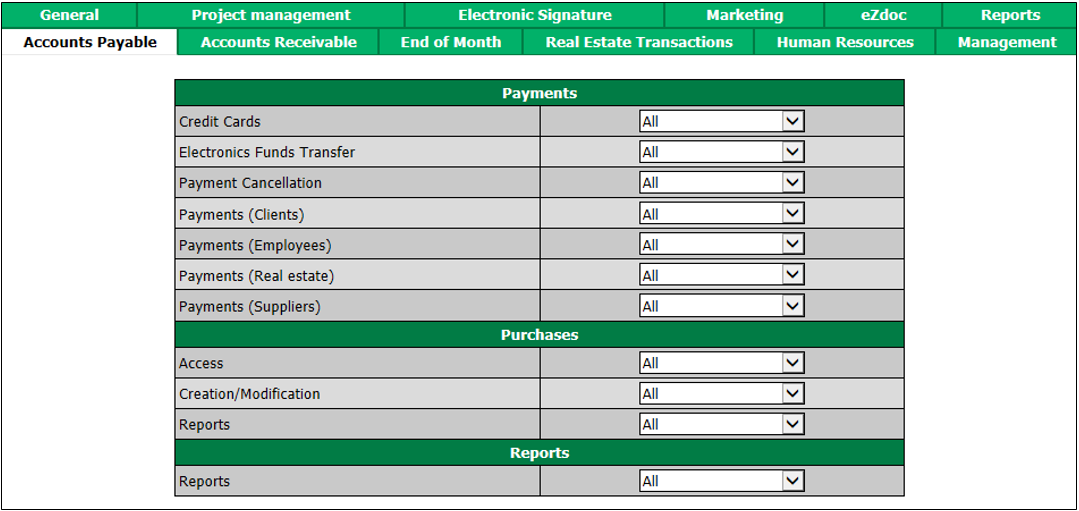
"Payments" section
Credit Cards : The user will be able to view, prepare and process payments by credit card for Suppliers.
Electronics Funds Transfe rs: The user will be able to view, prepare and process payments by electronic transfer for which "All" is selected from Clients , Employees , Real Estate and Suppliers.
Payment Cancellation : The user will be able to cancel payments by electronic transfer for which "All" is selected from Clients , Employees , Real Estate and Suppliers.
Payments**😗* The user will be able to view, prepare and process payments by cheque to:
- Clients
- Employees
- Real Estate****
- Suppliers
"Purchases" section
Access : The user will be able to view the list of purchases, the list of variables costs, the list of payment terms, the list of suppliers, the list of supplier groups and the list of purchasing groups.
Creation/Modification : The user will be able to view, add, edit and reverse purchases.
Reports : The user will be able to produce a purchase report.
"Reports" section
- Reports : The user will be able to produce an accounts payable report and a payment preparation report.