

English
Adding/Editing/Activation of a FINTRAC Question
When an agent creates a deal , he must answer a list of FINTRAC questions that must have been activated by the agency. It is possible to add and modify a question in this list.
NOTE: There is a mandatory question that agents must answer and that does not appear in the List of FINTRAC Questions. This question is: "Apart from the current transaction, has this client made at least 2 other transactions (deal or purchase) with your agency during the last five years?". It is possible to change this question in global configurations but it must always refer to business relationships.
Information
It is possible to configure the default answer to FINTRAC questions via the configurations of a department. From Main menu >> Config. >> List of Configurations per Department. Click on the desired Department. In the "Real Estate" tab, select the Default Value in the FINTRAC Module (none or "No") and click on Submit.
Adding a FINTRAC Question
From Main menu >> Real Estate >> FINTRAC >> List of FINTRAC Questions.
Click on Actions >> New Question.
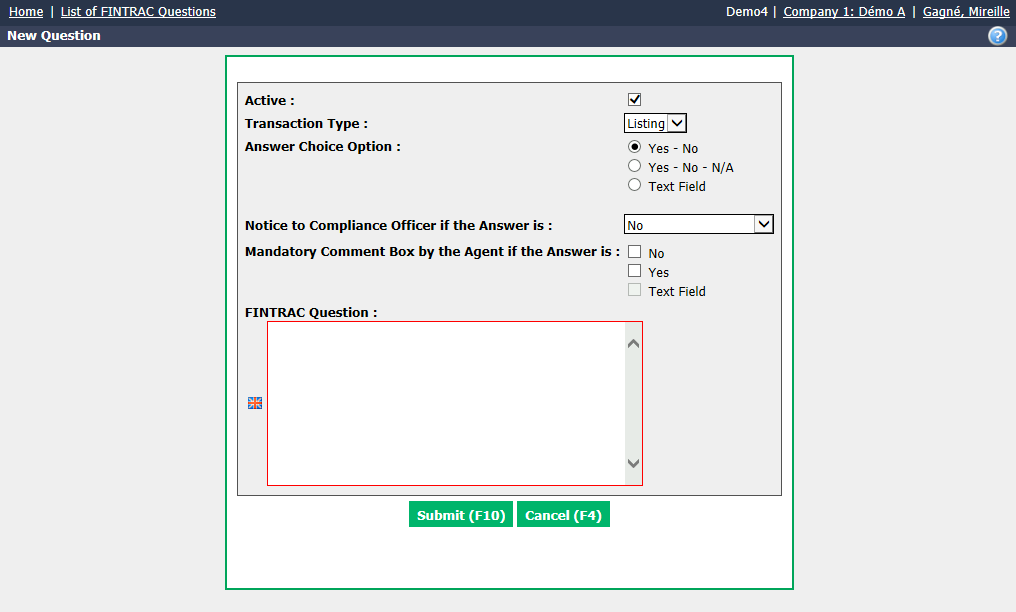
Active will be checked when the question is active. To inactivate a question, uncheck this box.
Select the desired Transaction Type : "Listing" or "Deal".
Answer Choice Option :
- Yes - No
- Yes - No - N/A ( N/A = Not applicable)
- Text Field : The agent may enter an answer other than "Yes" or "No" in the field provided for this purpose.
Notice to Compliance Officer if the Answer is : Select "Yes" (or "No" or "Text Field") if you want the compliance officer to receive an e-mail notification when a contact answers "Yes" (or "No" or "Text Field") to this FINTRAC question. If you don’t want him to receive notices about the answer, select "Do not receive notice."
Information
It is possible to configure the e-mail address of the compliance officer via the configurations of a department. From Main menu >> Config. >> List of Configurations per Department. Click on the desired Department. In the "Real Estate" tab, enter the Compliance Officer E-mail in the field and click on Submit.
Mandatory Comment Box by the Agent if the Answer is : Select the desired answer (No , Yes or Text Field) that will require the agent to enter a comment in the box.
Enter a FINTRAC Question in English as well as in French.
Click on Submit and the FINTRAC question will be added in the system.
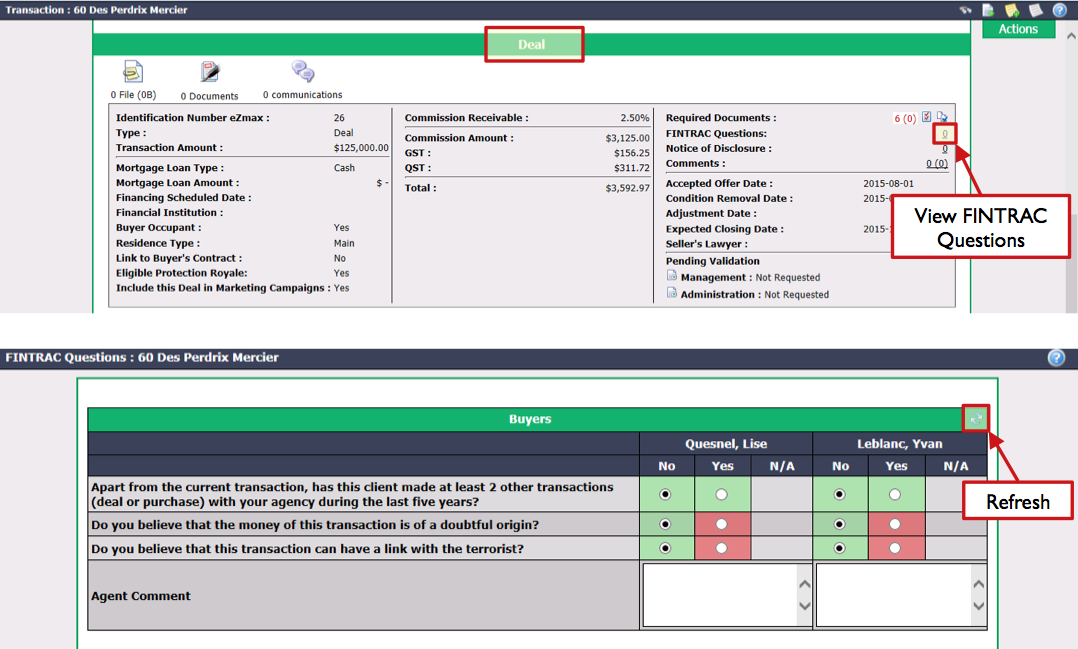
NOTE: By default, this new FINTRAC question will not be effective in transactions prior to the creation date of this question. If you want the question to appear in a previous transaction, you must go to the "Listing" or "Deal" section of the transaction and click on the number to the right of the FINTRAC Questions field to display the FINTRAC questions. Click on the Blue Arrows icon (Refresh) to add the new question.
**
Editing a FINTRAC Question**
To modify an existing FINTRAC question, select it from the List of FINTRAC Questions.
Click on Actions >> Edit Question.
Make the desired changes and click on Submit to save them.
**
Activation of a FINTRAC Question**
In order for agents to answer FINTRAC questions in a transaction, these questions must have been activated.**
From the desired transaction, click on Actions >> Edit transaction.
Go to the "Deal Information" section.
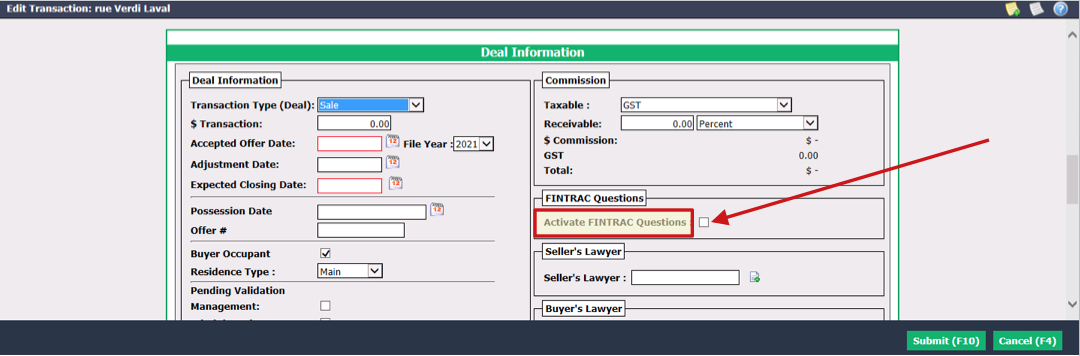
Check the Activate FINTRAC Questions box.
Click on Submit.